
I have a 64GB iPhone SE so in theory should be fine for available memory. Yes, I would prefer 128GB so that I never even consider such things, but I now find myself with 5GB remaining and am somewhat perplexed.
Music and photos are at the top of the list which is understandable and there is an element of automated memory management on the Photos side, but increasingly I am seeing apps that bloat for no good reason and it has reached the stage where they are becoming a problem.
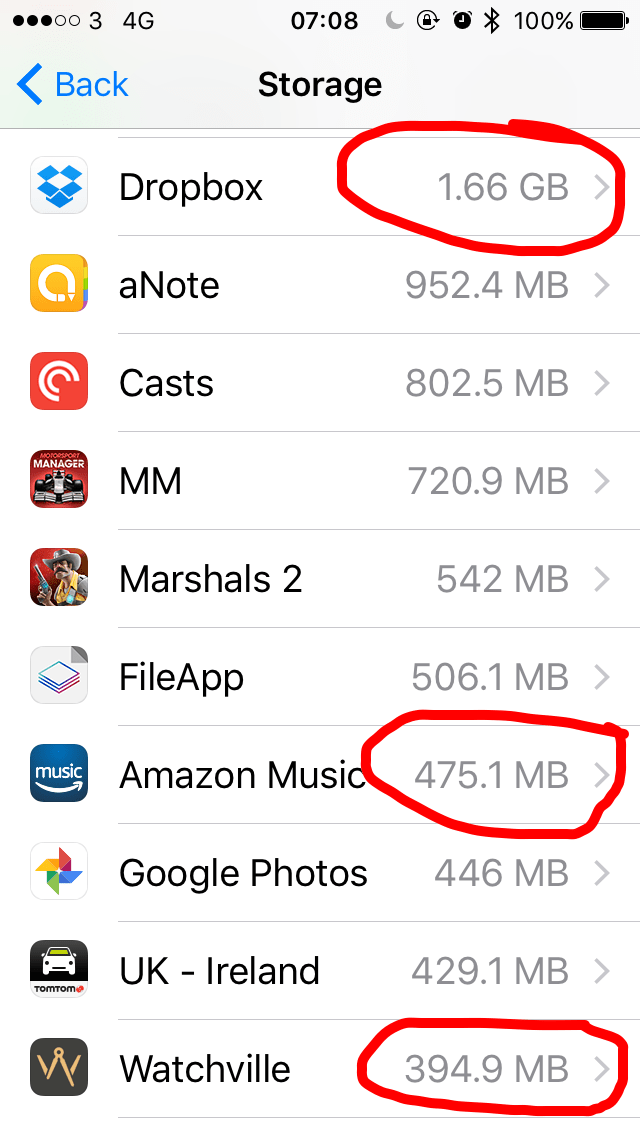
Look at the image above. Dropbox has no files stored on my iPhone, but handily decides that I want immediate access and so caches files continually- 1.66GB!
Amazon Music is another example of the same behaviour. I have no music downloaded on my iPhone, but 475.1MB!
And then there is Watchville which is a simple news app that displays the latest articles each day. Why on earth does it need to cache articles to the point that 394.9MB is required? It’s just a news app.
Instagram is 358.7MB, BeWeather is 340.2MB and so the list goes on. I am guessing that more than 3GBs of data is being wasted by apps that consume memory in exchange for quicker performance and I’m not sure where the balance needs to be set.
I would argue, however, that Apple needs to look closer at what it allows in order to block certain apps from needlessly using up valuable space.
Categories: Articles
 McGST
McGST 
I have a similar problem. I Flipboard had over 400MB of presumably cached articles that I’ve already read, because I don’t save anything for later. There’s a clear content cache setting as the very last entry under Advanced in Settings. But I have no idea why it was caching things in the first place.
One of the things that Onyx does on my Mac is to allow me to clear various caches. Some are useful, but many often get bloated because the OS or apps don’t clean things up. Unfortunately, we’ll never see something like Onyx on iOS unless Apple decides to do it, or via jailbreak.
LikeLike
In general the lack of transparency in memory usage is annoying – so much gets lumped under “Documents + Data”, vs “Apps”, vs (what I’m not too troubled by now but has been problematic in the past) that big lump of “Other”.
They talk about the underlying file system changing with…. I dunno, 10.3 ? I wonder if that will make any of this better.
LikeLike
You used to be able to look at the file system with 3rd party apps like iMazing, but they’ve closed that down. I doubt that a different file system will change this. Based on what I’ve seen, it looks similar to what we’re used to. Unless there’s a major change in philosophy, I think we’re stuck or screwed depending on how you look at it.
LikeLike
The only way I’ve found to clear an app, unless it has something built in, is to delete it and re-install. Anyone found a better way?
LikeLike